Learn the most common printing mistakes and how to avoid them. Discover expert tips for creating print-ready files, improving print quality, and reducing costly reprints.
In today’s competitive business environment, printed marketing materials continue to play a crucial role in building brand awareness and customer trust. Whether you’re ordering Business Card Printing, Brochure Printing, Flyer Printing, Sticker Printing, or Packaging Box Printing, the quality of your printed materials directly impacts how customers perceive your brand.
Unfortunately, many businesses make common printing mistakes that result in wasted money, delayed projects, and disappointing print quality. Most of these issues can be avoided by preparing proper print-ready files and understanding basic printing requirements.
In this guide, we’ll discuss the most common printing mistakes and explain how to avoid them for professional, high-quality printing results.
Why Avoiding Printing Mistakes Matters
Printing errors can lead to:
· Poor brand image
· Increased reprint costs
· Delayed marketing campaigns
· Customer dissatisfaction
· Waste of materials and resources
Whether you’re using Online Printing Services or working with a local printer, ensuring your artwork is prepared correctly helps achieve flawless results.
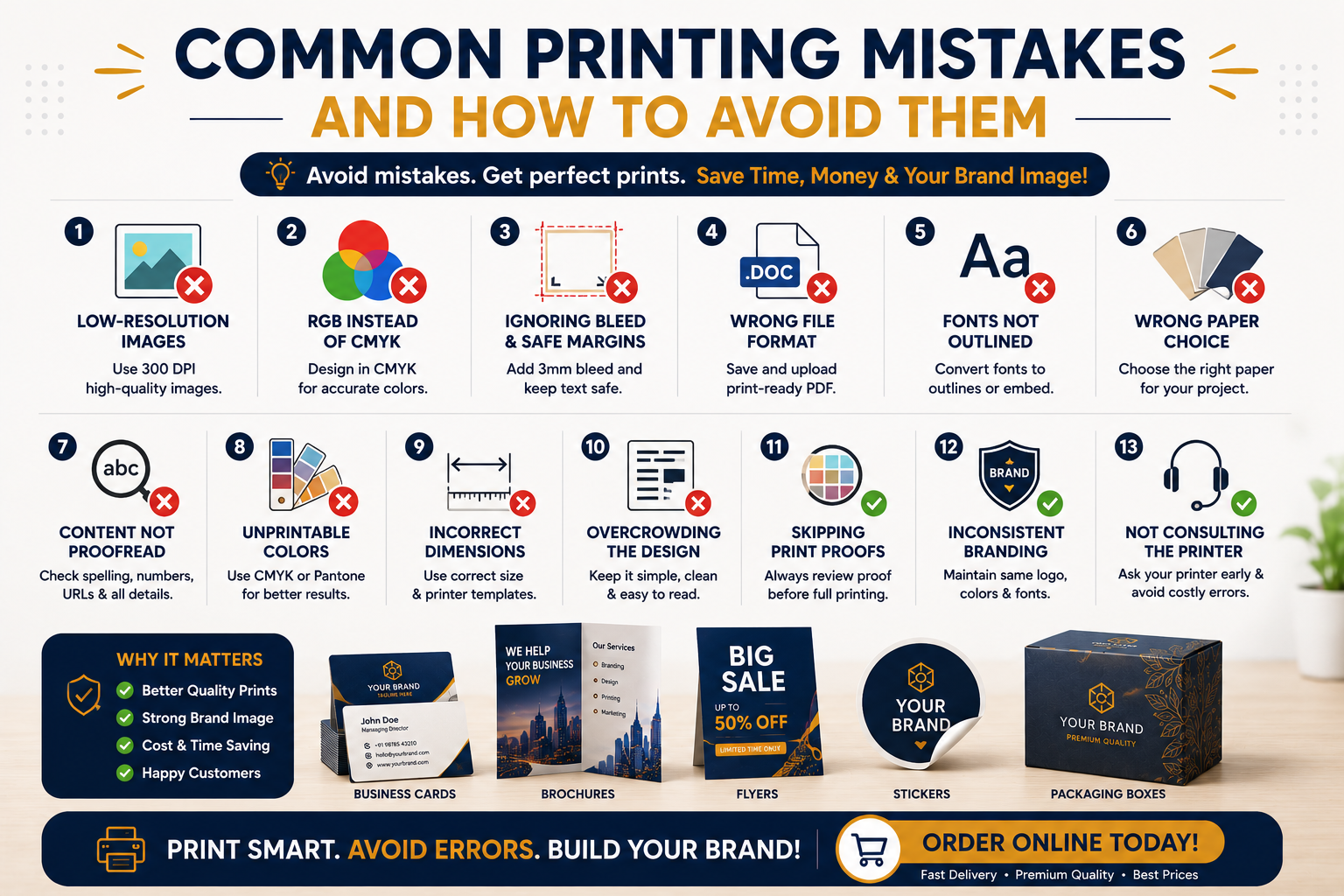
1. Using Low-Resolution Images
The Mistake
One of the most common printing mistakes is using images downloaded from websites or social media. These images are typically optimized for screens and have low resolution.
When printed, low-resolution images appear:
· Blurry
· Pixelated
· Unprofessional
How to Avoid It
Always use images with a minimum resolution of300 DPI (Dots Per Inch) for printing.
Before uploading your design for Custom Printing India, check that:
· Logos are in vector format (AI, EPS, SVG, PDF)
· Photos are high-resolution
· Images are not stretched beyond their original size
High-quality images ensure sharp and professional printing results.
2. Designing in RGB Instead of CMYK
The Mistake
Most digital screens display colors using the RGB (Red, Green, Blue) color model. However, commercial printers use CMYK (Cyan, Magenta, Yellow, Black).
Designing in RGB often causes color shifts when printed.
How to Avoid It
Always create artwork in CMYK mode before exporting your files.
Benefits include:
· Better color accuracy
· Predictable printing results
· Reduced risk of color mismatches
This is especially important for:
· Branding Materials
· Business cards
· Product packaging
· Marketing brochures
3. Ignoring Bleed and Safe Margins
The Mistake
Many people place text or important design elements too close to the edge of the artwork.
When trimming occurs after printing, important content may get cut off.
How to Avoid It
Use:
· 3mm bleed around the design
· Safe margin inside the trim area
For example:
· Extend background colors beyond the trim line
· Keep logos and text away from the edges
This is essential for Business Card Printing, Brochure Printing, and Flyer Printing projects.
4. Using the Wrong File Format
The Mistake
Submitting editable or unsupported files can cause formatting issues.
Examples:
· Microsoft Word files
· PowerPoint presentations
· Screenshots
· Compressed social media images
How to Avoid It
Use professional print-ready formats such as:
· AI
· EPS
· High-resolution TIFF
PDF remains the most preferred format because it preserves:
· Fonts
· Layout
· Images
· Colors
Always export high-quality print-ready files before placing an order.
5. Not Converting Fonts to Outlines
The Mistake
If your printer doesn’t have the font used in your design, the text may automatically change to another font.
This can ruin the design completely.
How to Avoid It
Before exporting:
· Convert text to outlines
· Embed fonts in PDF files
This ensures the printer sees the exact typography you intended.
6. Choosing the Wrong Paper Type
The Mistake
Even a great design can look disappointing on unsuitable paper.
For example:
· Thin paper for premium brochures
· Glossy paper for text-heavy documents
· Low-quality stock for luxury packaging
How to Avoid It
Select paper based on your printing purpose.
Examples:
Business Cards
Use:
· 300–400 GSM cardstock
· Matte or premium textured finishes
Flyers
Use:
· 130–170 GSM art paper
Brochures
Use:
· 170–250 GSM paper
Packaging
Use durable boards suitable for Packaging Box Printing.
Your chosen paper affects both appearance and durability.
7. Forgetting to Proofread Content
The Mistake
Spelling mistakes and incorrect information are among the most expensive printing errors.
Once thousands of copies are printed, corrections become costly.
How to Avoid It
Before approving artwork:
· Check spelling
· Verify phone numbers
· Confirm email addresses
· Review website URLs
· Verify pricing and product information
Have multiple people review the design before final approval.
A simple proofreading process can save significant costs.
8. Using Colors That Are Difficult to Print
The Mistake
Certain bright RGB colors cannot be accurately reproduced in CMYK printing.
As a result:
· Neon colors appear dull
· Bright blues and greens may shift
· Brand colors become inconsistent
How to Avoid It
Use:
· CMYK color values
· Pantone colors when brand consistency is critical
Request a printed proof if color accuracy is important for your Branding Materials.
9. Not Checking Design Dimensions
The Mistake
Submitting artwork with incorrect dimensions causes scaling issues and poor print quality.
Examples include:
· Incorrect business card size
· Wrong brochure fold dimensions
· Packaging artwork not matching box templates
How to Avoid It
Always use printer-provided templates and specifications.
Verify:
· Width
· Height
· Bleed area
· Fold marks
· Die lines
This is especially important for Packaging Box Printing and custom product packaging.
10. Overcrowding the Design
The Mistake
Trying to include too much information often results in cluttered designs that are difficult to read.
Common problems include:
· Too many fonts
· Excessive text
· Too many images
· Lack of white space
How to Avoid It
Follow good design principles:
· Use clear hierarchy
· Limit fonts
· Leave adequate spacing
· Focus on key messages
A clean and simple design is more effective than a crowded one.
11. Ignoring Print Proofs
The Mistake
Many customers approve artwork without reviewing a proof.
Small errors can go unnoticed until after printing.
How to Avoid It
Always request a proof before large production runs.
Check:
· Colors
· Alignment
· Spelling
· Image quality
· Layout
Proofing is one of the easiest ways to avoid costly reprints.
12. Using Inconsistent Branding
The Mistake
Businesses often use different logos, colors, and fonts across various printed materials.
This creates confusion and weakens brand recognition.
How to Avoid It
Maintain brand consistency across:
· Business cards
· Flyers
· Brochures
· Stickers
· Product packaging
Professional Branding Materials help customers remember and trust your business.
13. Ordering Without Consulting the Printer
The Mistake
Many businesses design first and ask questions later.
This often leads to technical issues and redesign costs.
How to Avoid It
Consult your printing provider before finalizing artwork.
A reliable provider offering Online Printing Services can guide you regarding:
· File formats
· Paper selection
· Finishes
· Bleed requirements
· Packaging templates
This saves time and prevents production delays.
Final Thoughts
Printing remains one of the most powerful tools for marketing, branding, and customer engagement. However, even the best designs can fail if common printing mistakes are overlooked.
By using properly prepared print-ready files, choosing the right materials, proofreading carefully, and following professional printing guidelines, businesses can achieve outstanding print quality while avoiding unnecessary costs.
Whether you’re investing in Business Card Printing, Sticker Printing,Brochure Printing, Flyer Printing, or Packaging Box Printing, taking the time to prepare your files correctly will ensure professional results every time.
At RCS Print, we provide reliable Online Printing Services and Custom Printing India solutions to help businesses create premium-quality Branding Materials that leave a lasting impression.